Guides
SaaS SEO Strategy: From Audit to Signups (2026)
A SaaS SEO strategy starts with an audit of what already blocks crawling and indexing, then builds pages for buying-stage queries (pricing, features, integrations, comparisons) before scaling top-of-funnel content.
By SEORecheck Research Team, SEO auditorsPublished 9 min read
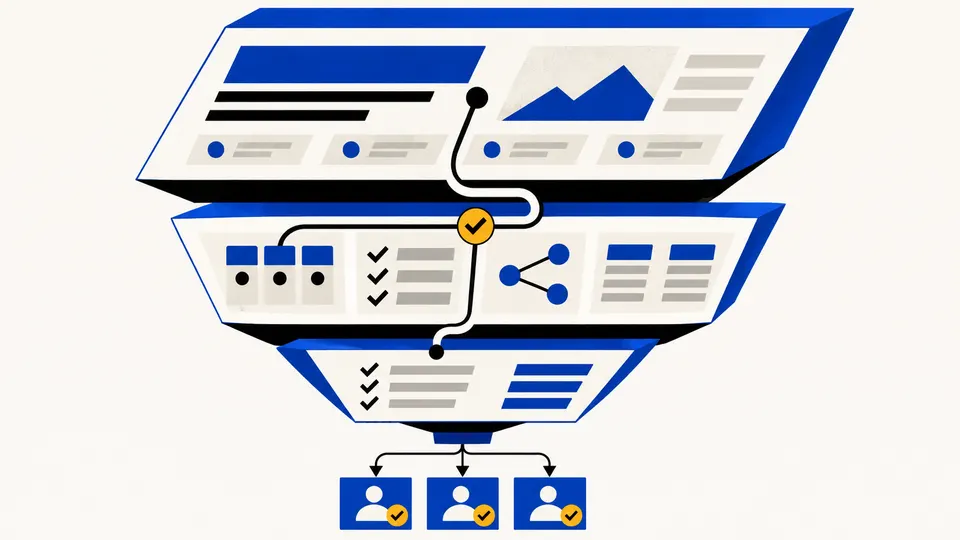
A SaaS SEO strategy is a plan for turning organic search into trials, demos and paid accounts. It starts with an audit of what already stops your site from being crawled and indexed. Then it builds pages for queries close to a purchase, like pricing, features, integrations and comparisons, and only after that scales educational content. Each stage gets measured by signups, not traffic.
Most software companies get the order backwards. They publish dozens of blog posts while their pricing page renders in JavaScript, their docs sit on an unindexed subdomain and no one can find the "X vs Y" page a buyer is actually searching for. This guide sets out the order that works, from the audit through to measurement.
What is a SaaS SEO strategy?
A SaaS SEO strategy decides which searches your product should win, which page type answers each search, and in what order you fix and build things. It differs from ecommerce or local SEO because software is sold through trials and demos, buyers compare tools before they commit, and much of the "site" is an app search engines should never see.
In practice it has four layers:
- Technical foundation. The marketing site, docs and help center can be crawled, rendered and indexed. The logged-in app can't.
- Buying-stage pages. Pricing, features, use cases, integrations, comparisons and alternatives.
- Educational content. Problem-led guides, templates and glossaries grouped into clusters around the jobs your product does.
- Measurement. Organic signups and pipeline by page type, not just sessions.
Every layer depends on the one before it. A great comparison page that Google can't render is worth nothing. A thousand blog posts that never link to a feature page bring traffic but few trials.
Why should a SaaS SEO strategy start with an audit?
Starting with an audit stops you from building on a broken base. SaaS sites tend to break in the same few places: client-side rendering, leaking app URLs, docs on separate subdomains, staging sites left indexable and pricing hidden behind scripts. If any of these is present, new content won't perform no matter how good it is.
A SaaS-specific audit should answer these questions first:
- Is the app separated from the marketing site? Login, dashboard and account URLs shouldn't be indexed. Use
noindexon pages Google can reach rather than blocking them in robots.txt alone. Google says that if a page is blocked by robots.txt, "the crawler will never see the noindex rule". - Does the content exist in the HTML? Google renders JavaScript, but it queues the rendering. Its JavaScript SEO basics still call server-side or pre-rendering "a great idea" because not every bot runs JavaScript. It also warns that a
noindextag in the original HTML may make Google skip rendering altogether. - Are links real links? Googlebot follows
<a href>elements. Single-page apps should use the History API, not URL fragments. - Are docs, help center and blog indexed and linked from the main site?
- Do pricing, plan limits and integration lists appear as text, not only inside images or interactive widgets?
Our SaaS SEO audit guide has the full checklist. For rendering issues in particular, see JavaScript SEO rendering problems. To see where your own site stands, a free audit crawls it in a real browser and reports indexability, rendering gaps, app URL leaks and the AI crawler checks for your marketing site.
How do you map SaaS keywords to the funnel?
You map SaaS keywords by grouping them by how close the searcher is to choosing a tool, then giving each group its own page type. People searching for "best invoicing software for agencies" or "Toolname pricing" are evaluating. People searching "how to write an invoice" are learning. They need different pages and convert at different rates.
| Funnel stage | Example query | Page type | Main conversion |
|---|---|---|---|
| Brand / navigational | "toolname login", "toolname pricing" | Pricing, login, homepage | Trial, plan upgrade |
| Comparison | "toolname vs competitor", "competitor alternatives" | Comparison and alternatives pages | Trial, demo |
| Solution | "invoicing software for agencies" | Use-case or industry page | Trial, demo |
| Feature / integration | "time tracking with Jira integration" | Feature page, integration page | Trial |
| Problem | "how to reduce late payments" | Guide, template, checklist | Newsletter, template download, trial |
| Definition | "what is accrual accounting" | Glossary entry | Internal link to guide |
Build from the top rows down. Bottom-of-funnel queries have small search volumes, but the people behind them already have a budget and a shortlist. Ten visitors comparing you with a competitor are usually worth more than a thousand reading a definition.
To find these queries, start with Search Console's Performance report filtered to your pricing, feature and comparison URLs. Then add the words your sales and support teams hear every week: competitor names, the integrations people ask about and the job titles of your buyers. Check each candidate keyword against the live results page. If Google shows listicles of tools, a single feature page won't rank. You need a comparison or "best X for Y" page. Our guide to search intent optimization explains how to read the results page.
Which pages should a SaaS site build first?
Build the pages buyers check right before they sign up: a crawlable pricing page, one page per core feature, use-case pages for your main customer segments, integration pages for the tools you really connect to, and honest comparison pages. They target the highest-intent queries and give your blog something to link to.
Pricing page
Put plan names, what each plan includes, limits and trial terms in plain HTML. If prices vary by region or need a sales call, say so in text. A pricing page that only loads inside a script or a calculator is hard for search engines and AI assistants to read.
Feature and use-case pages
Give each feature one URL and each customer segment one URL, and don't let them repeat each other. "Time tracking" (feature) and "time tracking for law firms" (use case) can both exist. But the law-firm page needs real differences: billing rules, compliance needs, screenshots of the workflows that matter to that segment.
Integration pages
Integration pages work well for SaaS because the queries are specific ("toolname Slack integration"). Each page should explain what syncs, in which direction, how to set it up and its limits. Pages that list integrations you don't support, or that only swap the partner's name, are the kind of thing Google's spam policies target (more on that below).
Comparison and alternatives pages
Buyers search for "X vs Y" and "X alternatives" whether or not you publish anything. If you don't, a review site or your competitor answers instead. Write these pages fairly. State where the other tool is better, add a feature table, keep it current and date it. Claims a buyer can check in a five-minute trial must be true.
Docs and help center
Documentation ranks for long-tail "how do I…" queries and answers the questions people ask AI assistants about your product. Keep it on an indexable path or subdomain and link to it from the main navigation and footer.
How do you scale SaaS content without it counting as spam?
Scale only pages that each have distinct, useful content. Google defines scaled content abuse as "many pages are generated for the primary purpose of manipulating search rankings and not helping users", with or without AI. Programmatic integration, template or location pages are fine when every page has real data a user needs.
A quick test for every programmatic template:
- Would the page be useful to someone who arrived from a link, not from search?
- Does each page have data the others don't (setup steps, field mappings, real examples, limits)?
- Could you remove the keyword-swapped sentences and still have a page worth reading?
Google's helpful content guidance gives the same warning signs in question form: "producing lots of content on many different topics in hopes that some of it might perform well," "using extensive automation to produce content on many topics," and "mainly summarizing what others have to say without adding much value." It also asks whether content shows first-hand expertise, "from having actually used a product." SaaS companies have a natural edge here. You own product data, support tickets and customer workflows that no competitor can copy.
For the blog, group articles into clusters around the jobs your product does, and link each guide to the related feature or use-case page. Topic clusters explains how to plan and link them.
How does AI search change a SaaS SEO strategy?
AI search adds a layer but doesn't replace the plan. Google states that "there are no additional requirements to appear in AI Overviews or AI Mode". A page must be indexed and eligible to show with a snippet, and Google adds that you "don't need to create new machine readable files, AI text files, or markup."
For SaaS, that means the same pages do double duty. When someone asks an assistant "what's a good invoicing tool for agencies, and how much does it cost?", the answer draws on pages that state pricing, features, integrations and comparisons clearly in text. What SaaS teams should add on top:
- Allow the AI search and user-triggered crawlers you want on the marketing site and docs in robots.txt, and decide separately on training bots.
- Keep product facts consistent across your site, docs, review profiles and Organization markup.
- Answer the questions buyers ask assistants ("does X integrate with Y?", "is there a free plan?") on crawlable pages.
The platform-by-platform details are in AI search optimization for SaaS.
How do you measure whether SaaS SEO is working?
Measure organic signups, trials and demo requests by landing page type, with traffic as a supporting signal. A strategy that grows blog sessions but not trials from pricing, comparison and feature pages isn't working yet, even if the traffic chart looks good.
Track these monthly:
- Search Console clicks and impressions grouped by page type (pricing, features, integrations, comparisons, docs, blog).
- Organic conversions in your analytics: trial starts, demo requests and signups, attributed to the first or landing page.
- Indexing coverage of your priority templates, so you catch new app URLs leaking in or feature pages dropping out.
- Assisted conversions from blog and docs pages that lead to a feature or pricing page.
Measure after technical fixes and new page launches, and compare like with like. SaaS demand is often seasonal around budgets and quarter ends.
What does a 90-day SaaS SEO plan look like?
A 90-day plan fixes the foundation first, then builds high-intent pages, then starts content clusters. The table below is a starting template. Adjust the order to whatever your audit finds most severe.
| Period | Focus | Typical tasks |
|---|---|---|
| Days 1–30 | Foundation | Noindex app and staging URLs, fix rendering of key templates, index docs, clean sitemaps, fix redirects |
| Days 31–60 | Buying-stage pages | Rewrite pricing in HTML, one page per core feature, top 3–5 comparison and alternatives pages, integration pages for real integrations |
| Days 61–90 | Content and measurement | First topic cluster linked to feature pages, conversion tracking by page type, re-audit to confirm fixes held |
Our guide on how to build an SEO improvement roadmap shows how to add owners and review points. To see what a prioritized plan looks like in practice, open the sample report.
Key takeaways
- A SaaS SEO strategy runs in this order: audit, then buying-stage pages, then educational content, with measurement throughout.
- Keep the app out of the index with
noindexGoogle can read, not with robots.txt blocks alone. - Pricing, features, integrations and comparisons need to be in crawlable HTML. They target the queries that turn into trials.
- Programmatic pages are safe only when each one has distinct, useful data. Google's scaled content abuse policy applies whether or not AI wrote them.
- AI Overviews and AI Mode have no extra requirements beyond being indexed and snippet-eligible, so clear product facts help both channels.
- Judge success by organic trials and demos per page type, not by sessions.